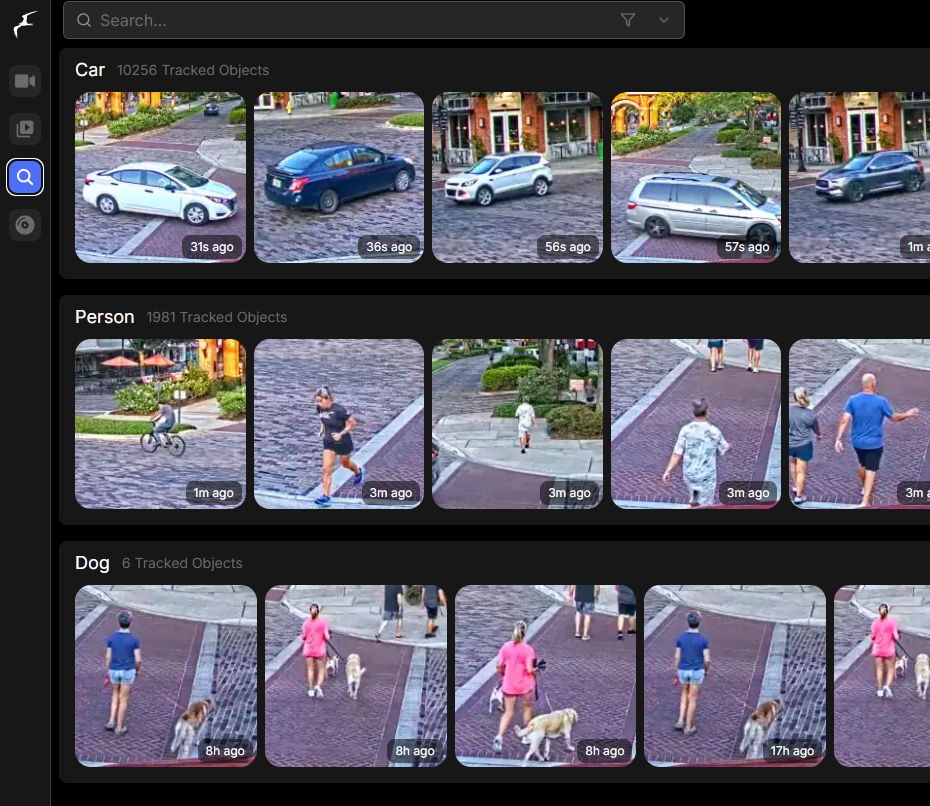
We set up Frigate – a self-hosted, AI-powered network video recorder – on your hardware and integrate it with your existing IP cameras and Home Assistant install. The work is done entirely remotely, with no engineer visit needed.
What we configure
- Frigate installation on your chosen platform – Proxmox LXC, Docker on an Intel NUC, Home Assistant OS add-on, or a dedicated mini-PC
- Camera onboarding for any RTSP or ONVIF IP camera (Hikvision, Dahua, Reolink, Amcrest, Annke, Ubiquiti, Tapo and similar)
- Object detection with per-camera zones, motion masks, and threshold tuning – eliminates false alerts from waving trees, passing headlights and shifting shadows
- Google Coral Edge TPU passthrough (USB or PCIe) for AI acceleration
- Recording schedule and retention tuned to your storage budget
- MQTT broker setup and full Home Assistant integration via the Frigate HACS add-on
- Lovelace dashboard cards for live view, event review and per-camera streams
- Automations: person-detected notifications, light triggers, recording-on-event, doorbell-style alerts
- Secure remote access
What Frigate gives you

Frigate is the open-source NVR most home-automation enthusiasts move to once they outgrow the cloud-tied apps that ship with their cameras. Three things make it different.
Real AI, running locally. Object detection – people, cars, animals, packages, bicycles – happens on your hardware. No images leave your network, no monthly subscription, no licence renewals. The trained models distinguish a person from a flag in the wind, which is what removes 90% or more of the false alerts you’d get from traditional motion-only detection.
Works with the cameras you already own. Anything that exposes an RTSP or ONVIF stream is supported. You don’t have to bin your existing Hikvision NVR or your Reolink doorbell – Frigate taps the camera feed directly and runs alongside whatever you’ve already got.
Genuinely deep Home Assistant integration. Every detection becomes an event in Home Assistant – “person seen at front door at 21:14” – with a snapshot attached. Trigger lights, send mobile notifications, start recordings, or feed the event into a wider automation. The Frigate HACS integration exposes each camera and each detection class as a Home Assistant entity.

Integration with existing CCTV
Frigate doesn’t replace your cameras – it sits beside them. We pull the camera’s existing RTSP stream into Frigate, leaving your current NVR untouched if you want belt-and-braces redundancy. Many homeowners keep their existing NVR running for 24/7 continuous recording, with Frigate handling the smart-detection layer on top. If you’d rather retire the NVR entirely, Frigate can also do continuous recording itself, with retention policies set per camera.
Integration with Home Assistant
If you already run Home Assistant, Frigate plugs in cleanly. We install the Frigate HACS integration, point it at your Frigate instance, and every camera plus every detection class appears as a Home Assistant entity. From there, automations are straightforward – for example: if a person is detected at the side gate after 22:00, turn on the floodlight, send a notification with the snapshot to my phone, and start a 30-second recording.
For users not yet running Home Assistant, we can include a basic Home Assistant install on the same machine as part of the project if you’d like one set up.
Hardware: bring your own or buy a pre-configured set from us
Two routes – pick whichever fits your situation.
1. Use hardware you already own or want to source yourself. Minimum spec: 4-core CPU, 8GB RAM, SSD for the OS, separate HDD for recordings. Better: an Intel N100 mini-PC or similar paired with a Google Coral USB Accelerator. Send us your kit list before you buy and we’ll sanity-check it – it’s much cheaper to catch an under-spec’d NUC at the order stage than after it’s arrived.
2. Buy a pre-configured set from us. We supply a mini-PC sized to your camera count, with the Coral USB Accelerator, storage drives, and Frigate already installed and tested before it leaves our bench. Plug it into your network, grant us temporary remote access for the final camera onboarding and Home Assistant integration, and that’s the install done. Fastest path from zero to a working system – the only manual job at your end is the network cable.
If you go the pre-configured route, the box arrives with our standard Frigate baseline already in place (sensible defaults for zones, detection thresholds, retention and MQTT). The remote configuration session is then just about your specific cameras and your specific automations, rather than from scratch.
How it works
- Enquiry via the form below – describe your cameras, your existing kit and what you want Frigate to do. Any follow-up questions are handled by email.
- Plan and fixed-price quote sent by email – including the recommended Frigate configuration approach, hardware advice (BYO or pre-configured kit from us), and lead time. Approve by email reply.
- Hardware sorted – either we sanity-check your kit list and you order it yourself, or we ship you a pre-configured set ready to plug in.
- Remote install and configuration – you grant temporary remote access (Tailscale, AnyDesk or RustDesk – your choice). Typically completed in a few remote sessions, coordinated by email.
- Walk-through video plus 30-day email support – a screen recording showing the setup in action and explaining how to tune zones, add cameras and adjust automations yourself going forward, plus an email support window for fine-tuning afterwards.
Why us
Samotech runs the same stack in-house – multiple cameras, Coral Edge TPU acceleration, Frigate on Proxmox, Home Assistant for the automation layer. The configuration we’ll deliver is the same one we use ourselves, not a template lifted from a YouTube tutorial.
Get a tailored plan and quote
Every Frigate install is different – number of cameras, what kit you already own, what existing CCTV or NVR you have, and what you want Home Assistant to do with the events. Rather than a one-size-fits-all price, we work out a tailored plan and quote based on your specifics.
Tell us about your setup using the form below. We’ll come back within two working days with:
- A recommended Frigate configuration approach for your kit
- Whether your existing hardware will cope, or you’d be better off with a pre-configured set from us
- A fixed price for the work, broken down line by line
- A realistic lead time
No obligation. The whole engagement runs by form, email and remote access – no phone calls.


